Houdini Node Generation

I’m grinding on a personal project that will require a lot of 3D assets, meshes that will be textured and exported to a game engine. In this post I’m sharing a python script that can be put into a Houdini shelf tool and executed to give a starting point, without having to memorize all the different parameters that need to be set.

Here’s it is, I’ll explain more after the code block:

# --- Modules

import datetime # Console timestamping

# --- Variables

# Vertical node graph spacing
vertOffset = hou.Vector2(0, -1.05)
vertOffsetSum = hou.Vector2(0, 0)

# Stores node object references, paths
assetNodeRefs = [] # Stores node object references
assetNodePaths = [] # Stores full tree paths of nodes

# --- Functions

# Utility that spits out all the parameters for a given node
def dumpParms(myNodePath):
tempNodeParms = hou.node(myNodePath).parms()

# Iterate and print them out
for idx, param in enumerate(tempNodeParms):
if idx == 0: # Print node path once
print("For node: " + myNodePath)
tempValue = param.eval()
tempName = param.name()
print("Name: " + tempName + " [ " + str(tempValue) + " ]") # Some need to be cast str

return

def makeNode(myPath, myType):
# Debug
print("Making node at: " + myPath + " Type: " + myType)
# Assign node reference
tempNodeRef = hou.node(myPath).createNode(myType)
# Keeping track of node object references in makeDefaultAsset function
#spawnedNodes.append(tempNodeRef) # Original - Deprecated
# Get created node path
tempNodePath = tempNodeRef.path()

return tempNodeRef, tempNodePath

# I don't like the X, Y offset for automatic layout, just want a Y offset for created nodes
def adjPosition(myNodeRef, myOffset): # Takes node reference, applies Y offset
# Global var for sum
global vertOffsetSum
# Get current node position
tempNodePos = myNodeRef.position() # [X, Y]
# Apply Y offset
offsetNodePos = hou.Vector2(0, (tempNodePos[1] + vertOffsetSum[1]))
# update offset sum
vertOffsetSum = (0, (vertOffsetSum[1] + myOffset[1]))
# Apply cumulative offset position to node
myNodeRef.setPosition(vertOffsetSum)

return offsetNodePos

# Takes two node object references
def wireNodes(nodeFromRef, nodeToRef): # Assumes first input index, first output index
# Make connection
nodeFromRef.setInput(0, nodeToRef, 0)

return

def getNodeRef(myNodeName): # Takes spawned node name, returns object reference if matched
tempNodeObj = None
for nodePath in assetNodePaths: # Using global list of stored spawned node paths
if hou.node(nodePath).name() == myNodeName: # Check node name - matches?
tempNodeObj = hou.node(nodePath) # Then get node object reference

return tempNodeObj

# First element is top "root" node of the structure - for more complex topologies, you'll have
# to make changes to this code, including my assumptions about created node names
# Nodes are created in the order listed, left to right, using node type names

assetNodeList = ['geo', 'box', 'groupcreate', 'xform', 'normal', 'uvunwrap', 'attribcreate',
'merge', 'uvlayout', 'material', 'groupcreate', 'output', 'rop_fbx']

# Parameter Settings Keys/List - Access syntax nodeParamsList[0]['nodename'][0]['paramkey']
# Yes, this assumes that the node name is the first ever created (nodename1), and for my uses
# it will be - this would require more thorough checking if that assumption isn't true
#
# Hovering your mouse cursor over a parameter in the Houdini node details pane provides the
# referenced parameter name in its pop-up, which is used below - or dump a node's parameters
# using my dumpParms(yournodetreepath) helper function I've provided

nodeParamsList = [{
'attribcreate1' : [
{'name1':'path'}
],
'uvlayout1' : [
{'correctareas' : 1}, {'axisalignislands' : 2}, {'scaling' : 1}, {'scale' : 1},
{'rotstep' : 0}, {'packbetween' : 0}, {'packincavities' : 1}, {'padding' : 1}, {'paddingboundary' : 1},
{'expandpadding' : 0}, {'targettype' : 1}, {'usedefaultudimtarget' : 1}, {'defaultudimtarget' : 1001},
{'tilesizex' : 1}, {'tilesizey' : 1}, {'numcolumns' : 10}, {'startingudim' : 1001}, {'stackislands' : 0}
],
'group2' : [
{'groupname' : 'rendered_collision_geo_ucx'}
],
'rop_fbx1' : [
{'sopoutput' : 'Mesh_AddPathChangeThisName.fbx'}, {'mkpath' : 1}, {'buildfrompath' : 1}, {'pathattrib' : 'path'},
{'exportkind' : 0}, {'sdkversion' : ' '}, {'vcformat' : 0}, {'invisobj' : 0}, {'axissystem' : 0},
{'convertaxis' : 0}, {'convertunits' : 1}, {'detectconstpointobjs' : 1}, {'exportendeffectors' : 0},
{'computesmoothinggroups' : 1}
]
}]

shaderParamsList = [{
'principledshader1' : [
{'basecolorr' : 1.0}, {'basecolorg' : 1.0}, {'basecolorb' : 1.0}, {'albedomult' : 1.0},
{'basecolor_usePointColor' : 0}, {'basecolor_usePackedColor' : 0}, {'rough' : 1.0}, {'metallic' : 1.0},
{'reflect' : 1.0}, {'baseBumpAndNormal_enable' : 1}, {'baseNormal_vectorSpace' : 'uvtangent'}
]
}]

# Note that on the ROP FBX node converting units is disabled
standinParamsList = [{
'polyreduce1' : [
{'percentage' : 50}
],
'rop_fbx2' : [
{'sopoutput' : 'Mesh_AddPathChangeScaleProxyName.fbx'}, {'mkpath' : 1}, {'buildfrompath' : 1}, {'pathattrib' : 'path'},
{'exportkind' : 0}, {'sdkversion' : ' '}, {'vcformat' : 0}, {'invisobj' : 0}, {'axissystem' : 0},
{'convertaxis' : 0}, {'convertunits' : 0}, {'detectconstpointobjs' : 1}, {'exportendeffectors' : 0},
{'computesmoothinggroups' : 1}
]
}]

def makeDefaultAsset(): # Make nodes based on node list of types
objRootPath = '/obj' # Root path for first geo node
matRootPath = '/mat' # Root path for material principle shader nodes
childPath = ''
# Create root, then child nodes
for idx, nodeType in enumerate(assetNodeList):
if idx == 0: # Root node?
tempNodeRef, tempNodePath = makeNode(objRootPath, assetNodeList[idx])
assetNodeRefs.append(tempNodeRef)
assetNodePaths.append(tempNodePath)
childPath = tempNodePath # Assign root path
else: # Child of root node, use root node path
tempNodeRef, tempNodePath = makeNode(childPath, assetNodeList[idx])
if idx > 1: # Start wiring nodes when we're at second child node inside root
# This assumes input index 0, from first output
tempNodeRef.setInput(0, assetNodeRefs[idx-1], 0)

assetNodeRefs.append(tempNodeRef)
assetNodePaths.append(tempNodePath)

# Iterate Nodes Parameter List and set parameters accordingly
for nodeName in nodeParamsList[0]:
# Get node object reference for spawned node name
tempObjRef = getNodeRef(nodeName)
# If we have an object reference, set parameter(s)
if tempObjRef is not None:
# Iterate through parameters and set them
for idx, setting in enumerate(nodeParamsList[0][nodeName]):
# Debug
#print("For node name: " + nodeName + " Setting " + str(idx) + " is: " + str(nodeParamsList[0][nodeName][idx]))
tempObjRef.setParms(nodeParamsList[0][nodeName][idx])

# Now adjust positions of all nodes
for nodeRef in assetNodeRefs:
adjPosition(nodeRef, vertOffset)

# Create Principle Shader Node in /mat context
shaderNodeRef, shaderNodePath = makeNode(matRootPath, 'principledshader')
# May not make sense to set all parameters here - but I have the full list archived in the project folder
# Set node name
shaderNodeRef.setName("mat_changethisname")
# Additional setup parameters
for idx, setting in enumerate(shaderParamsList[0]['principledshader1']):
# Debug
#print("For principled shader - Setting " + str(idx) + " is: " + str(shaderParamsList[0]['principledshader1'][idx]))
shaderNodeRef.setParms(shaderParamsList[0]['principledshader1'][idx])
# Assign to 'material1' '/obj' node object ref index [9] using 'materialpath1' parameter
assetNodeRefs[9].setParms({'shop_materialpath1' : '/mat/mat_changethisname'})

# Create two more nodes for 'stand in' objects used as scale proxies when constructing scenes/levels
polyReduceRef, polyReducePath = makeNode(childPath, 'polyreduce') # Reduce polygons
rop_fbx2Ref, rop_fbx2Path = makeNode(childPath, 'rop_fbx') # Another ROP fbx output
# Set polyreduce params, fbx params
for idx, setting in enumerate(standinParamsList[0]['polyreduce1']):
# Debug
#print("For node name: polyreduce1 " + " Setting " + str(idx) + " is: " + str(standinParamsList[0]['polyreduce1'][idx]))
polyReduceRef.setParms(standinParamsList[0]['polyreduce1'][idx])

for idx, setting in enumerate(standinParamsList[0]['rop_fbx2']):
# Debug
#print("For node name: rop_fbx2 " + " Setting " + str(idx) + " is: " + str(standinParamsList[0]['rop_fbx2'][idx]))
rop_fbx2Ref.setParms(standinParamsList[0]['rop_fbx2'][idx])
# Connect polyreduce1 to output of material1, connect rop_fbx2 to output of polyreduce1
wireNodes(polyReduceRef, assetNodeRefs[9]) # From node, To node - check function for labeling consistency
wireNodes(rop_fbx2Ref, polyReduceRef)

# Custom positioning using X and Y offset for these two nodes - using standInOffset:
collNodeRef = hou.node('/obj/geo1/group2') # Get group2/collision mesh node X, Y position [0, -11.55]
standInVertOffset = collNodeRef.position()
polyNodePos = hou.Vector2(-3.0, standInVertOffset[1])
rop_fbx2Pos = hou.Vector2(-3.0, (standInVertOffset[1] + (vertOffset[1] * 2)))
# Set positions
polyReduceRef.setPosition(polyNodePos)
rop_fbx2Ref.setPosition(rop_fbx2Pos)

return

# --- Main Exec

# Clear console a bit
print('\n' * 4)

# Timestamp Banner
timeStamp = datetime.datetime.now()
print("\n ----------[ TallTim - Default Asset Node Generator Exec: " + str(timeStamp) + " ]---------- \n")

# Generate Default Geometry Asset for Unreal Engine Export As FBX, With Collision Mesh
makeDefaultAsset()

#dumpParms('/obj/geo1/uvlayout1) # Get parameters

# set names by <nodeRef>.setName('myName')

Here’s the result, a generated network of nodes that takes less than a second:

I’ll step through why each node is there, including why I have two FBX output nodes – which may seem confusing at first, but it will make sense, I promise.

Keep in mind that this is in the path or context of Houdini’s ‘/obj’ level – while it is entirely possible to make other assets with this automatically, my first use was to create a ‘/obj/geo’ node with all its sub-nodes so I could start modeling something right away.

From the top down (I’m omitting numbers for most of them since Houdini puts a ‘1’ after the first instance of a node.):

  1. Box – This is a ‘primitive’ type in Houdini, which just creates a 6-sided cube. I’ll typically replace this with other things, curves, swept extrusions, whatever – the box is just there as a stand-in.
  2. Group – I like keeping things orderly, so for multi-mesh parts I will make group names for them which makes it easier to refer to if I need to do any specific actions on them later.
  3. Transform – Not absolutely necessary, but may be needed to place the object on the ‘ground’ construction plane.
  4. Normal – After the polygons have been created, I find it useful to have normals applied, since later UV mapping and texturing works much better if everything is uniform.
  5. UV Unwrap – This prepares the mesh for a later step when it comes to texture mapping.
  6. Attribute Create – This allows me to create a ‘path’ value that tells the FBX exporter my object consists of multiple meshes, very handy when using Substance Painter, since you can then easily mask and select individual parts.
  7. I just realized that my code example doesn’t set these parameters entirely (always something, there’s a lot of moving parts) – but the “Class” setting needs to be “Primitive” and “Type” needs to be “String”. Once this is set, you can type in something like: “intro_basic_monitor/monitor_frame” — where the first part is the ‘root’ model name, and the latter is the part name. Really helps later down the line.
  8. Merge – This is where you’d combine all of your parts using the nodes described so far. I left this in because I rarely make anything that is just one single part.
  9. UV Layout – Here’s where the meat of setting up texture mapping happens. I’m using UDIMs, a method to spread high resolution textures over a larger texture space, but this would still be necessary if you were using regular texturing methods. Setting parameters here automatically really saves time.
  10. Material – This node assigns your texture, which lives under the ‘/mat’ context – yes, this script automagically created a material shader for you too. You’ll have to rename the material and such, but helps to have it set up already.
  11. You’ll notice that there’s a branch ‘split’ here – and I’ll explain briefly why. The ‘rop_fbx1’ node is my high-resolution output mesh. The ‘rop_fbx2’ node is used for ‘proxies’ that I create so I can assemble a large scene/level in Houdini without copying their associated node netorks, polyreduced and referencing a FBX file. This keeps overhead low and allows me to work on a new asset for a scene without using up a lot of CPU/GPU to do it. May not matter if you have a beast of a rig, but for me I know my scenes will have a lot of things in them, so I’m getting ahead of that now.
  12. The next two nodes are related to Unreal Engine and collision meshes used in the physics engine.
  13. Group2 – The name ‘rendered_collision_geo_ucx’ tells UE that it should create a collision mesh that matches the following node.
  14. Output – This node is how UE understands the object geometry and allows it to create a collision mesh on import. You can customize these, but I haven’t attempted that yet.
  15. rop_fbx1 – As I described above, this node saves a high-resolution mesh to a path specified, with the proper parameters. You’ll have to specify the path yourself, its set to some dummy value here.

Another note about this python script – the ‘assetNodeList’ variable assumes that the FIRST node is the ‘root’ under the ‘/obj’ context. The rest of the nodes are children of this ‘root’ node. If you wanted to make a different asset using this, you’d have to change how I detect/handle the root node type, but its totally doable with a few small alterations.

That’s it for now, quite a long post. I’ll post more as I get time.

Houdini Scene Export To Unreal

Today I’m sharing at shelf tool that I wrote for Houdini, but the end result can be duplicated in other 3D applications like Blender. All you need is to follow the format and export Object Name, Position, Rotation, Scaling like I have. Here’s a sample of how that output looks:

ObjName,Position,Rotation,Scale
Mesh_TestCube01,"[0.0, 0.0, 0.0]","[0.0, -45.0, 0.0]","[1.0, 1.0, 1.0]"
Mesh_TestCube02,"[-0.4, 1.25, 0.0]","[0.0, 0.0, 0.0]","[0.1, 0.5, 0.5]"

Not too intimidating, right? My aim was to make this as simple as possible, so any 3D modeling application can produce this output.

Here’s the shelf tool Python script, I’ll explain the design assumptions after the code block:


# --- Modules

import csv, os, sys
import datetime # Console timestamping
import math # Truncating decimals

# --- Variables

exportNames = []
exportPaths = []
exportPropList = []

# --- Functions

def childrenOfNode(node, filter): # Returns full path for filter type
paths = []

if node != None:
for n in node.children():
t = str(n.type())
if t != None:
for filter_item in filter:
if (t.find(filter_item) != -1):
# Append raw path list matching filter
paths.append(n.path())

return paths

def truncate(number, decimals=0): # Truncates decimals to a given precision
factor = 10.0 ** decimals

return math.trunc(number * factor) / factor

def vectorToFloats(myVector): # Takes vector object and returns elements
tempFloatList = []
# Need to truncate values, currently getting 16-decimal precision, lol
# Functionally same as myVector.x()
tempX = truncate(myVector[0], 3)
tempY = truncate(myVector[1], 3)
tempZ = truncate(myVector[2], 3)
tempFloatList = [tempX, tempY, tempZ]

return tempFloatList

def getFBXPrefix(myNodePath): # Uses node path to extract fbx prefix
# When constructing scenes, I'm using file nodes to load the exported .fbx
# of individual assets - so I need to distinguish from a scene that has them
# versus one that does not

if hou.node(myNodePath + '/rop_fbx1') is None:
fbxNode = hou.node(myNodePath + '/file1')
fbxFileName = fbxNode.parm('file').eval()
else:
fbxNode = hou.node(myNodePath + '/rop_fbx1')
fbxFileName = fbxNode.parm('sopoutput').eval() # Get param value

#print("FBX output parameter is: " + fbxFileName + "\n")
# split slashes
fbxNameSplit = fbxFileName.split('/')
# Get last element for output filename
fbxNameRaw = fbxNameSplit[-1]
# Split out .fbx extension
fbxNameSplit = fbxNameRaw.split('.')
# Get FBX output filename
fbxOutputName = fbxNameSplit[0]
print("Output fbx file prefix is: " + fbxOutputName + "\n")

return fbxOutputName

def getNodePosRotScale(myNodePath): # Gets info, returns list
tempObjList = [] # Temp list to store properties
tempPathSplit = myNodePath.split('/')
# Instead of using object name, using output filename prefix from rop_fbx1
tempObjName = getFBXPrefix(myNodePath)
# Get next to last element of path split for obj name
#tempObjName = tempPathSplit[(len(tempPathSplit)-1)]
# Get reference to node
tempObj = hou.node(myNodePath)
# Get world transform
tempObjWorld = tempObj.worldTransform()
# Get position as a vector
tempObjPos = tempObjWorld.extractTranslates() # 'srt' is the default
# Get rotations
tempObjRot = tempObjWorld.extractRotates()
# Get Scaling
tempObjScale = tempObjWorld.extractScales()
# Debug - objects are vector3, messing with casting/stripping strings
#print("Pos: " + str(tempObjPos).split(','))
# Need to figure out casting from Vector3 to string
vecPosFloats = vectorToFloats(tempObjPos)
vecRotFloats = vectorToFloats(tempObjRot)
vecScaleFloats = vectorToFloats(tempObjScale)
# Debug
#print(str(vecPosFloats))
# Populate list - name, position, rotation, scaling
#tempObjList = [tempObjName, tempObjPos, tempObjRot, tempObjScale]
tempObjList = [tempObjName, vecPosFloats, vecRotFloats, vecScaleFloats]

return tempObjList


# --- Main Exec

# Filter For Object Geo Nodes
node_root_path = '/obj'

exportPathsRaw = childrenOfNode(hou.node(node_root_path),["Object geo"])

# Clear console a bit
print('\n' * 4)

# Debug
timeStamp = datetime.datetime.now()
print("\n ----------[ TallTim - CSV To Unreal Export Tool at " + str(timeStamp) + " ]---------- \n")

# Search for UEA suffix in object node names
for pathItem in exportPathsRaw:
pathSplit = pathItem.split('_')
# Debug
print("UEA Search loop - Path Item is: " + pathItem)
# Error on ScaleReference_UEA
# AttributeError: 'NoneType' object has no attribute 'parm'
# I have to look at file nodes

if pathSplit[-1] == 'UEA': # Got export suffix?
# Get node information using path
myListResult = getNodePosRotScale(pathItem)
print(myListResult)
print("\n")
exportPropList.append(myListResult) # Build final list

csvPath = '<YourExportPathHere>'
# With quote MINIMAL option headers appear as they should
csvHeaders = ['ObjName','Position','Rotation','Scale']
# Options - NONNUMERIC, MINIMAL, NONE - requires escapechar='<char>'
#csvQuoteType = csv.QUOTE_NONNUMERIC
csvQuoteType = csv.QUOTE_MINIMAL
#csvQuoteType = csv.QUOTE_NONE

# Get hip project filename for scene export
projNameRaw = os.path.dirname(hou.hipFile.name())
# Split out slashes
projNameSplit = projNameRaw.split('/')
# Get project name from file
projName = projNameSplit[-1]
# Full write path and filename
csvPathFilename = csvPath + projName + '.csv'

# Open file for writing CSV
with open(csvPathFilename, mode='w', encoding='utf-8') as csvfile:
# Create writer object for file
writer = csv.writer(csvfile, delimiter=',', quotechar='"', quoting=csvQuoteType, lineterminator='\n')
# Write header row
writer.writerow(csvHeaders)
# Iterate final list and write rows
for propRow in exportPropList:
writer.writerow(propRow)

Houdini is a node-based system, so any SOP (Surface OPerator – anything that makes meshes) can have a name assigned to it. This looks for a name format like: YourMeshName_UEA the suffix stands for “Unreal Engine Asset”, and was just a way for me to differentiate between objects I was exporting and those I were not, like cameras and simulations, etc..

The script then queries all those objects for their parameters and builds rows for the CSV file before finally writing the header and that data at the end. Blender supports Python, so I’m sure someone could figure out how to do this as well pretty easily. The end result is a file that is named after the “scene” filename, so something like “LevelTest01.csv” is the output.

If you pair this with my Unreal Engine Scene importer, and point that script at the proper root folder where your assets live, it will use this information to replicate your scene, without having to do one bit of work in Unreal, which saves a lot of time.

Here’s the Scene Importer script for Unreal:

##  ______      ___________          _      
## /_ __/___ _/ / /_ __(_)___ ___ ( )_____
## / / / __ `/ / / / / / / __ `__ \|// ___/
## / / / /_/ / / / / / / / / / / / / (__ )
##/_/ \__,_/_/_/ /_/ /_/_/ /_/ /_/ /____/
##
## Unreal Engine Asset Spawner - Exported CSV Sets Position, Rotation, Scale
## Less manual drudgery, more asset creation!
##
## This takes a .csv file written from Houdini and spawns meshes with the correct settings
## The eventual goal is to make it so an arbitrary marker can be used to adjust multiple assets
## in a scene dynamically in UE to aid in level design. (Not implemented yet.)

## CSV Export format is: (So any program like say, Blender, etc that can use scripts to write a CSV file will work.)
## ObjName,Position,Rotation,Scale
## Mesh_LevelBlock01,"[0.0, -0.35, 0.0]","[0.0, 0.0, 0.0]","[1.0, 1.0, 1.0]"

# ---- Modules

import unreal
from unreal import Vector # Fun with vectors
from unreal import Rotator # fun with rotations
import os
import csv
import pandas as pd
import pathlib # For directory structure scanning

# ---- Variables
myDataPath = '<Your path to the exported CSV file here>'
myCSVFile = '<Your CSV file name>.csv'

myProjectPath = '<Your root project asset path here>' # Root path to scan for meshes to import

tempObjList = []
tempPropertyList = []
assetMeshPathList = []
resultFlag = None

priorAsset = "Nothing" # Keeps track of assets, so we don't bother loading in duplicate object references in UE
objIndexCounter = 0 # Initialize object index counter - handles dupe objects in Scene CSV file
files = os.listdir(myDataPath) # Get directory contents

df_SceneList = pd.DataFrame()
meshFilePrefixList = []

# ---- Functions

def dumpListContents(myInputList):
for item in myInputList:
# Note - unreal warning messages will show 'None' at end of list, but this is not an element in the list itself
unreal.log_warning(item)
#print(item) # Shows list normally

return

# Gets all actors in scene, useful for some debugging
def dumpLevelActorsList():
actorsList = unreal.EditorLevelLibrary.get_all_level_actors()

for actor in actorsList:
actorLabel = actor.get_actor_label()
actorPos = actor.get_actor_location()

if (actorLabel == 'YourActorLabelHere'):
unreal.log_warning('actorLabel= %s actorPos=%s' % (actorLabel, actorPos))

return

# Takes path/filename.csv and throws it into a list - deprecated, using pandas dataframes
# But useful if you want to play with lists instead
def readCSVFile(myFile):
tempSceneList = []
with open(myDataPath + '/' + myFile, mode='r') as file:
csv_data = csv.reader(file)
for row in csv_data:
tempSceneList.append(row)

return

# This function takes a set object, output list and converts to a list of strings
def convertSet(mySetObject, myOutputList):
for item in mySetObject:
tempstr = str(item)
myOutputList.append(tempstr)

return

def readProjectMeshes(assetRootPath):
# Temp destination path
tempDestPath = ""
# temp Mesh list
FBXList = []
# Get directory contents under Assets
assetListRaw = pathlib.Path(myProjectPath) # Set root directory to recursively make list from
# Isolate FBX, UDIM Textures
FBX_Assets = assetListRaw.rglob("*.fbx") # Grab our mesh file paths
# Convert from rglob to set
FBX_SetObject = map(str, FBX_Assets)
#Texture_SetObject = map(str, Texture_Assets)
# Iterate set objects and convert to string list
convertSet(FBX_SetObject, FBXList)
#convertSet(Texture_SetObject, TextureList)

return FBXList#, TextureList # Return mesh list for processing

def extractDestPath(myPathRaw): # This takes the first raw fbx import path and determines structure for destination
tempIndex = -1
destPathList = []
myDestPath = "/Game/<Your folder name here>" # This is your UE destination path - '/Game' is always root
tempPathLength = -1
tempSplitPath = myPathRaw.split('\\')
# Determine where "Assets" begins
for idx, folder in enumerate(tempSplitPath):
if folder == "Assets":
tempIndex = idx

# Now iterate based on start index and build the destination path
for idx, folder in enumerate(tempSplitPath):
if idx >= tempIndex:
destPathList.append(folder)

tempPathLength = len(destPathList)
# Iterate final list and build destination path, with '/Game' as root
for idx, folder in enumerate(destPathList):
if idx <= (tempPathLength-2): # Leave off last element since its a file
myDestPath = myDestPath + '/' + folder

# Store the mesh names without the extension here
if idx == (tempPathLength-1): # Get last element for filenames
# Debug
#unreal.log_warning("Last elment is: " + folder) # gives Mesh_<name>.fbx
# split out the file extension
folder_split = folder.split('.')
# Get filename element
folder_Filename = folder_split[0]
# Debug
#unreal.log_warning("Mesh filename is: " + folder_Filename)
meshFilePrefixList.append(folder_Filename) # Store filename prefix result
# Debug
#unreal.log_warning("Extracted destination path is: " + myDestPath)

return myDestPath

def stringToList(myString): # Converts exported strings to floats - format '[x, y, z]'
# Debug
#print("StringToListFunc - Type being passed in is: ", type(myString)) # show type... log warning doesn't support this
#unreal.log_warning("StringToList Func - string to convert is: " + myString)
# Strip the '[' and ']' from the string
stripLeft = myString.strip('[')
stripFinal = stripLeft.strip(']')
# Split the result using ', ' separator
tempList = stripFinal.split(', ')
# Convert list to floats
tempListFloat = [float(item) for item in tempList]

return tempListFloat

# This checks against the scene object list and returns True/False
def checkSceneList(myAssetName):
for sceneObj in tempObjList:
if myAssetName == sceneObj:
resultFlag = True
return resultFlag
else:
resultFlag = False

return resultFlag

# ---- Main Execution Steps

# Debug - using warning color to highlight output for visibility in the UE5 Log Window
unreal.log_warning('.')
unreal.log_warning("----------[ TallTim's Asset Spawner And Property Settings Utility ]----------")
unreal.log_warning('.')

df_SceneList = pd.read_csv(myDataPath + '/' + myCSVFile)

# Get number of dataframe rows and columns
dataDimensions = df_SceneList.shape
dataRows = dataDimensions[0]
dataCols = dataDimensions[1]
# Debug
#unreal.log_warning("Scene List dimensions - Columns: " + str(dataCols) + " Rows: " + str(dataRows))

# Debug - print dataframe Contents
unreal.log_warning("Scene List Dataframe Contents: \n" + df_SceneList.to_string())

# Iterate rows to populate a list of objects to find in the Content Browser
for row in range(dataRows):
tempObjName = df_SceneList.loc[row, "ObjName"]
# Select Object Name column and append value
if tempObjName != "Mesh_Marker": # Filtering for top-level OBJ name on the marker - just for testing
tempObjList.append(tempObjName)

# Debug
#unreal.log_warning(dumpListContents(tempPropertyList)) # Works

projectMeshPathRaw = readProjectMeshes(myProjectPath) # Returns list of meshes in root project path - mirrors the imported folder structure
# Debug
#unreal.log_warning("Paths list to meshes: ")
#unreal.log_warning(projectMeshPathRaw)

# This makes sure the project Mesh Path Raw elements equals the length of the object Scene File CSV
if len(projectMeshPathRaw) != dataRows:
# Store difference
sceneDiff = dataRows - len(projectMeshPathRaw)
# Get last element to append
tempMeshPath = projectMeshPathRaw[-1]
# Debug
#unreal.log_warning("Project meshes don't equal scene file mesh names, checking for duplicates in Scene CSV File.")
#unreal.log_warning("Difference (Scene Rows - Project Mesh Names): " + str(sceneDiff))
# Append number elements so it equals CSV Scene rows
for i in range(sceneDiff):
projectMeshPathRaw.append(tempMeshPath)

#else: # Debug
# unreal.log_warning("Project meshes equals scene file mesh names, continuing with processing.")

# For each Mesh path found in the project folder structure, extract the destination path to load references
for meshPath in projectMeshPathRaw:
assetMeshPathList.append(extractDestPath(meshPath))

# Debug
#unreal.log_warning("Extracted paths to imported meshes: ")
#unreal.log_warning(assetMeshPathList)

# Debug - Object names
#unreal.log_warning("Scene Object Contents From CSV File: ")
#unreal.log_warning(dumpListContents(tempObjList))
#unreal.log_warning("Object list length is: " + str(len(tempObjList)))

# Debug
#unreal.log_warning("Prior to main loop, Asset Mesh Path List holds: ")
#unreal.log_warning(assetMeshPathList)

# Process each mesh asset and set properties
for idx, asset_path in enumerate(assetMeshPathList):
tempLoadAssetPath = asset_path + '/' + meshFilePrefixList[idx]
# Debug
#unreal.log_warning("Loading path to spawn: " + tempLoadAssetPath)
assetPrefix = meshFilePrefixList[idx] # Get meshfile name and add it to path
sceneCheckFlag = checkSceneList(assetPrefix) # Checks if asset is in the scene dataframe, "Marker" is filtered out for now...
# Debug
#unreal.log_warning("Scene check result is: " + str(sceneCheckFlag))
# Only attempt to load/set values for objects that pass the scene check
if sceneCheckFlag == True:
# Debug
#unreal.log_warning("Prior Asset is: " + priorAsset)
# Avoid loading more than one object reference when objects are duplicated in the Scene CSV file
if assetPrefix != priorAsset: # Not an object dupe?
finalLoadAssetPath = tempLoadAssetPath + '.' + assetPrefix
tempObjRef = unreal.load_asset(finalLoadAssetPath) # Assign reference - path.meshfileprefix
priorAsset = assetPrefix
priorObjRef = tempObjRef # Assign prior object reference to use if duplicates found
# Debug
#unreal.log_warning("Unique Asset to set parameters is: " + assetPrefix)
#df_tempSceneIndex = df_SceneList.loc[:, ["ObjName"]] # This gives a dataframe with only the ObjName column
# Debug
#print("Temp Scene Index is: ")
#print(df_tempSceneIndex)
#print("Index: " + str(objIndexCounter) + " element is: " + df_tempSceneIndex.iloc[objIndexCounter]["ObjName"])
# Assign lists for Pos,Rot,Scale vectors for Unique asset
posListRaw = df_SceneList.iloc[objIndexCounter]["Position"]
rotListRaw = df_SceneList.iloc[objIndexCounter]["Rotation"]
scaleListRaw = df_SceneList.iloc[objIndexCounter]["Scale"]
# Process strings into float-casted lists
posList = stringToList(posListRaw)
rotList = stringToList(rotListRaw)
scaleList = stringToList(scaleListRaw)
# Increment index counter
objIndexCounter += 1
else:
# If asset prefix equals prior - its a Duplicate
tempObjRef = priorObjRef # use the prior stored object reference
# Debug
#unreal.log_warning("Duplicate Asset to set parameters is: " + priorAsset)
# Assign lists for Pos,Rot,Scale vectors for Duplicate asset
posListRaw = df_SceneList.iloc[objIndexCounter]["Position"]
rotListRaw = df_SceneList.iloc[objIndexCounter]["Rotation"]
scaleListRaw = df_SceneList.iloc[objIndexCounter]["Scale"]
# Process strings into float-casted lists
posList = stringToList(posListRaw)
rotList = stringToList(rotListRaw)
scaleList = stringToList(scaleListRaw)
# Increment index counter for next object
objIndexCounter += 1

# Now we do our final property settings for the asset
unit_factor = 100 # Compensates for Houdini units to Unreal Engine
# FBX Meshes are exported from Houdini with "Y-Up Right Handed", but the "Convert to specified axis system" and "Convert Units" is checked
# Position/Translation X, Z, Y - Unreal uses Z-up
objPosition = Vector(posList[0]*unit_factor, posList[2]*unit_factor, posList[1]*unit_factor)
# Rotation X, Z, Y
objRotation = Rotator(rotList[0], rotList[2], rotList[1])
# Scale X, Z, Y
objScale = Vector(scaleList[0], scaleList[2], scaleList[1])
# Apply Position and Rotation to spawned object
tempObjSpawn = unreal.EditorLevelLibrary.spawn_actor_from_object(tempObjRef, objPosition, objRotation)
# Apply scaling to spawned object
tempObjSpawn.set_actor_scale3d(objScale)

More to come, as I get these tools for my pipeline together. Note – The above assumes you are using the FBX Importer for Unreal I wrote in this post.

FBX Mesh Export To Unreal

Documenting my journey from mesh import to making tools, and beyond. Part One.


Its been a while, I tend to get involved in something and squeeze that fruit until there’s nothing left but pulp and seeds. My last exploration was using an indie voxel game engine, but that proved to be too limited – so I’m charting a course straight into the dark forest of pro “Triple A” game engines.

I’ve used Houdini before, and now I’m familiar with the interface and some of its (many) features. While it isn’t a prerequisite for any of the things I write about here, you can pick up the “Apprentice” version for free if you want to follow along.

The tools I’m working on use Python, and within Unreal Engine they’ll be using a mixture of Python and C++, but most of this can be generalized to any 3D Model making software that supports some kind of scripting within it. Blender uses Python, so these tools could be adapted – I’m using CSV files (Just regular text files with human-readable data), so any program that can write that and FBX mesh files should be just fine.

(I recommend this viewer for FBX files since it works on multiple platforms. Gives a good preview and lets you see if you need to address any surface problems.)

Where to begin?

It all started with a basic computer monitor model I made in Houdini FX, textured in a slapdash fashion with Adobe Substance Painter (RIP Allegorithmic):

In the beginning, my asset creation steps were: Make something in Houdini, save the mesh FBX, import into Substance Painter, throw on some textures, then export those textures to use inside of Houdini like the above example.

That’s cool, but when it came to pushing it to a game engine like Unreal, I ran into a problem:

It had textures in Houdini, and I thought since the FBX file format allows you to ‘point’ to texture files that it would pick those up and apply them automatically. Nope!

Here’s what the material looked like in Unreal Engine:

After some cursing and digging around, I found that UDIM texture support in FBX seems to be limited right now to Autodesk’s Action software, and 3D Modeling programs like Maya/Houdini, etc.

I wanted to use UDIM (Also referred to as Virtual or Streaming Textures) because it allowed high-quality texture maps to be used, which appealed to me. I may still fall back to the more common method of “regular” texture maps, but for now I had my heart set on UDIMs.

I knew that Unreal Engine could support it – but I wasn’t going to get instant satisfaction from using an FBX file I made in Houdini. When you export meshes in FBX file format with Houdini, it uses a “token” to tell the Material Node that you’re working with a UDIM texture set.

Here’s how they look in my asset folder:

(Each one starts at 1001, I call it the ‘head’ of the set.)

Each ‘100x’ starting at 1 and going to 7 are the texture maps spread out across different UDIM tiles. In Unreal Engine, you can select just the ‘1001’ of each set and drag it into the content browser. Unreal will understand they are UDIM/Virtual Textures, and import them correctly.

Here’s what the “token” looks like in Houdini when you’re assigning them to a material:

(The “<UDIM>” tells Houdini its part of a Virtual Texture set.)

On a whim, I exported the FBX file in ASCII mode, and edited all references to the UDIM token to ‘1001’, just to see if Unreal Engine would understand its was part of a set. The results were not what I had imagined:

On the plus side, at least it attempted to ‘wire up’ all the sampler nodes:

These results meant that I’d have to use the Unreal Editor to create a Material, and then wire up the individual sampler nodes to tell it exactly how I’m using the UDIM textures, instead of it happening automatically.

If you multiply that effort over a lot of assets to be made, that burns a lot of time hand-editing things. There had to be a better way than just grinding through it manually.

Turns out, there was. But it would require a bit of work.

The Descent Into Automation:

Like anything new, it was a bit annoying to get started, since Application Programming Interfaces (API’s) usually don’t give you much in the way of examples. Here’s the main page for the Python API in Unreal Engine, for instance.

If your eyes didn’t glaze over in the first few minutes, you must be a life-long programmer, probably with a career in Information Technology. Anyone starting out with this would be pretty frustrated, as it isn’t geared towards beginners.

Adding to that, the examples I found with search engines ended up going over the river and through the woods into a “Backrooms” pocket dimension before I even finished reading the tenth line of code.

My first attempt to make a python script to handle the importing task was hardcoded, inflexible and banged out in a short amount of time. But I knew that I had to understand it first before I added a infinite improbability drive and popped by Alpha Centauri.

I knew I didn’t have to do any specific file type checking, which was a plus. The Unreal Editor was smart enough to figure that part out on its own.

Behold, in all its rough glory:

(Things in “< >” are meant to be replaced with your specific paths)

# Some basic setup, importing the main module and then setting a few things for easier reference

import unreal

# These references save you typing all this over and over
AT = unreal.AssetToolsHelpers.get_asset_tools()
AID = unreal.AutomatedAssetImportData()
EAL = unreal.EditorAssetLibrary

# Set paths to make the list easier to construct - Windows paths use '/' here
importBasePath = '<drive letter>:/<your path to a FBX file>'
importTexturePath = '<drive letter>:/<your path to UDIM texture files>'

# This is the list to our assets - you only need to include the 'head' of the UDIM sets here, UE5 understands they're virtual
# I'm using Substance Painter, so the exported names use the conventions below. Substitute for whatever yours happens to be
importFileNames = [importBasePath + 'yourMeshName.fbx',
importTexturePath + '<YourTextureName>_DefaultMaterial_BaseColor.1001.png',
importTexturePath + '<YourTextureName>_DefaultMaterial_Normal.1001.png',
importTexturePath + '<YourTextureName>_DefaultMaterial_OcclusionRoughnessMetallic.1001.png']

# Now we set the destination for our assets - /Game is the default root here in the UE5 Content Browser
AID.destination_path = '/Game/<your path where you want this>'
AID.filenames = importFileNames

# Optionally when testing you may want to just replace things, this statement does that
AID.replace_existing = True

# Now lets import using our list
AT.import_assets_automated(AID)

# Now lets create a new blank material
AT.create_asset(asset_name='YourMaterialName', package_path='/Game/<your path where you want this>', asset_class=unreal.Material, factory=unreal.MaterialFactoryNew())

# To add -- Wiring up the UDIM textures to this blank material.... I haven't done this part yet, I'll update when I do...

# Assign the texture to the mesh
# Maybe there's a more elegant way to do this, but I just loaded a reference to the mesh and the blank texture

# Mesh reference
myAsset = unreal.load_asset('/Game/<your path>/<your mesh name>')

# Texture reference
myMatToAssign = unreal.load_asset('/Game/<your path>/<your texture name>')

# Set material
myAsset.set_material(0, myMatToAssign)

Not a bad start, but it was limited. What I needed was something more dynamic that would read my project folder path and mirror its structure in the UE Content Browser. After a few intermediate versions, I came up with this (ASCII Art needs to make a comeback.):

##  ______      ___________          _      
## /_ __/___ _/ / /_ __(_)___ ___ ( )_____
## / / / __ `/ / / / / / / __ `__ \|// ___/
## / / / /_/ / / / / / / / / / / / / (__ )
##/_/ \__,_/_/_/ /_/ /_/_/ /_/ /_/ /____/
##
## Automagic Asset Import & Material Wiring Utility
## Less manual drudgery, more asset creation!
##
## Note - This relies on a project structure like:
## < Root Project Path>< Project Asset FBX Directiory >
## < Asset "Texture" Sub-directory >
## Failing to provide any textures in this sub-directory will result in a material created and 'wired' up, but the texture slots will be blank

# ---- Modules

import unreal
import pathlib # This is for filtering directories

# ---- Variables

test_flag = "False" # Just to make things easier when testing material assignment - Make sure to change the list used in the last FOR loop
#test_flag = "True"

# Unreal utility references
AT = unreal.AssetToolsHelpers.get_asset_tools()
AID = unreal.AutomatedAssetImportData()
MEL = unreal.MaterialEditingLibrary
EAL = unreal.EditorAssetLibrary

# Path declarations
# Automatic destination path working, initialize global var
importDestPath = ''
myProjectPath = 'YourProjectPathHere\Assets' # Root path to scan for files

# Global list vars for asset lists
FBXList = []
TextureList = []

# New list from scanned folders
scannedFileNames = []

# Test fileset definitions - Just useful if doing dev testing on a smaller sub-set of assets - A lot has changed, so might not work now
# Your project path to FBX meshes here
test_FBXList = ['YourPathHere\Mesh_YourMeshName.fbx']
# Your project path to Textures here
test_TextureList = ['YourPathHere\Textures\yourBaseColor.1001.png'] # etc...

# ---- Functions

# This function takes a set object, output list and converts to a list of strings
def convertSet(mySetObject, myOutputList):
for item in mySetObject:
tempstr = str(item)
myOutputList.append(tempstr)

return

def extractDestPath(myPathRaw): # This takes the first raw fbx import path and determines structure for destination
tempIndex = -1
destPathList = []
myDestPath = "/Game/Testing" # For now, this will change later
tempPathLength = -1
tempSplitPath = myPathRaw.split('\\')
# Determine where "Assets" begins
for idx, folder in enumerate(tempSplitPath):
if folder == "Assets":
tempIndex = idx

# Now iterate based on start index and build the destination path
for idx, folder in enumerate(tempSplitPath):
if idx >= tempIndex:
destPathList.append(folder)

tempPathLength = len(destPathList)
# Iterate final list and build destination path, with '/Game' as root
for idx, folder in enumerate(destPathList):
if idx <= (tempPathLength-2): # Leave off last element since its a file
myDestPath = myDestPath + '/' + folder

# Debug
#unreal.log_warning("Extracted destination path is: " + myDestPath)

return myDestPath

# This function takes your project root and makes different string element lists for further processing
def readProjectAssets(assetRootPath):
# Temp destination path
tempDestPath = ""
# Temp list merging all results
masterOutputList = []
# Get directory contents under Assets
assetListRaw = pathlib.Path(myProjectPath) # Set root directory to recursively make list from
# Isolate FBX, UDIM Textures
FBX_Assets = assetListRaw.rglob("*.fbx")
Texture_Assets = assetListRaw.rglob("*_DefaultMaterial_*.1001.*") # Only returns the 'head' of UDIM texture sets
# Convert from rglob to set - might be redundant, but whatever, I need to get some work done lol
FBX_SetObject = map(str, FBX_Assets)
Texture_SetObject = map(str, Texture_Assets)
# Iterate set objects and convert to string list
convertSet(FBX_SetObject, FBXList)
convertSet(Texture_SetObject, TextureList)
# A hand test flag just in case you want to do some debug on a limited set defined above
if test_flag == "False":
masterOutputList = FBXList + TextureList

if test_flag == "True":
masterOutputList = test_FBXList + test_TextureList

# Technically I could do this on the FBXList, but leaving it like this...
tempDestPath = extractDestPath(masterOutputList[0]) # Process based on first import item

return FBXList, TextureList # Return separate lists for importing

def dumpListContents(myInputList):
for item in myInputList:
unreal.log_warning(item)

return

def importAssets(myMeshList, myTextureList):
# This method 'throttles' things on its own since you're driving a loop and resetting the
# properties of the task every iteration -- seems it needs to do this or it fails making things fast enough
meshTasks = []
textureTasks = []
task = unreal.AssetImportTask()
# Debug
extractMeshList = []
extractTextureList = []
# Do the meshes
for pathItem in myMeshList:
# Clear list every iteration
extractMeshList = []
# Set properties
task.set_editor_property('filename', pathItem) # Source filepath
task.set_editor_property('destination_path', extractDestPath(pathItem)) # Update dest path
task.set_editor_property('automated', True)
task.set_editor_property('replace_existing', True)
meshTasks.append(task) # Shove task into list
# Do import per iteration - testing doing batched again
AT.import_asset_tasks(meshTasks) # Doing this here in the loop 'throttles' things.
# Debug
#extractMeshList.append(extractDestPath(pathItem))

# Debug
#unreal.log_warning("Extracted mesh list is: ")
#dumpListContents(extractMeshList)

# Do the textures
for pathItem in myTextureList:
# Clear list every iteration
extractTextureList = []
# Set properties
task.set_editor_property('filename', pathItem) # Source filepath
task.set_editor_property('destination_path', extractDestPath(pathItem))# + '/Textures') # Update dest path
task.set_editor_property('automated', True)
task.set_editor_property('replace_existing', True)
textureTasks.append(task) # Shove task into list
# Do import
AT.import_asset_tasks(textureTasks) # Like above, doing it here 'throttles' things
# Debug
#extractTextureList.append(extractDestPath(pathItem))

# Testing doing it all batched again -- this fails with the same problems as before. Interesting..
#AT.import_asset_tasks(textureTasks)

# Debug
#unreal.log_warning("Extracted texture list is: ")
#dumpListContents(extractTextureList)

# # This method was fast, but couldn't update the destination paths dynamically like the above...
# # Set import attributes - should be conditional on list type
# AID.destination_path = importDestPath # Dest path for meshes
# #AID.filenames = myAssetList # - deprecated
# AID.filenames = myMeshList # Do meshes first
# AID.replace_existing = True # Supposed to replace existing, but when testing it seemed to prompt anyway
# # Do mesh import
# AT.import_assets_automated(AID)
# # Now set up texture imports
# AID.destination_path = importDestPath + '/Textures' # Dest for textures
# AID.filenames = myTextureList
# AID.replace_existing = True
# # Do texture import
# AT.import_assets_automated(AID)

return

def wireUpTextures(myMaterialPath, myMaterialAssetName): # Textures are assumed to be under impoortDestPath + "Textures" subfolder
# Debug
#unreal.log_warning("Wiring up texture with material name: " + myMaterialAssetName)
# Get material reference for wiring operations
tempMatObject = unreal.load_asset(myMaterialPath + '/' + myMaterialAssetName)
# Split out prefix to use asset name in reference - naming convention is 'Mat_YourMaterialName' in this example
UDIM_Name = (myMaterialAssetName.split('_'))[1]
# Set up references to UDIM textures we've already imported into the content browser
# Texture name format: 'Mesh_<assetname>_DefaultMaterial_<texturetype>
UDIM_Base_Color = unreal.load_asset(myMaterialPath + '/Textures' + '/Mesh_' + UDIM_Name + '_DefaultMaterial_BaseColor')
UDIM_Normal = unreal.load_asset(myMaterialPath + '/Textures' + '/Mesh_' + UDIM_Name + '_DefaultMaterial_Normal')
UDIM_Occlusion_Roughness_Metallic = unreal.load_asset(myMaterialPath + '/Textures' + '/Mesh_' + UDIM_Name + '_DefaultMaterial_OcclusionRoughnessMetallic')
# Make Nodes - Target Material Reference, Sampler Node, X coord, Y coord
Tex_BaseColor = MEL.create_material_expression(tempMatObject, unreal.MaterialExpressionTextureSample, -400, 0)
Tex_Normal = MEL.create_material_expression(tempMatObject, unreal.MaterialExpressionTextureSample, -400, 300)
Tex_OccRoughMetallic = MEL.create_material_expression(tempMatObject, unreal.MaterialExpressionTextureSample, -400, 600)
# Connect sampler Nodes to material
MEL.connect_material_property(Tex_BaseColor, "RGB", unreal.MaterialProperty.MP_BASE_COLOR)
MEL.connect_material_property(Tex_Normal, "RGB", unreal.MaterialProperty.MP_NORMAL)
# In this case different color channels represent properties: Red = Occlusion, Green = Roughness, Blue = Metallic
# Properties from unreal.MaterialProperty:
# 'MP_AMBIENT_OCCLUSION', 'MP_ANISOTROPY', 'MP_BASE_COLOR', 'MP_EMISSIVE_COLOR', 'MP_METALLIC', 'MP_NORMAL', 'MP_OPACITY', 'MP_OPACITY_MASK', 'MP_REFRACTION', 'MP_ROUGHNESS', 'MP_SPECULAR', 'MP_SUBSURFACE_COLOR', 'MP_TANGENT'
MEL.connect_material_property(Tex_OccRoughMetallic, "R", unreal.MaterialProperty.MP_AMBIENT_OCCLUSION)
MEL.connect_material_property(Tex_OccRoughMetallic, "G", unreal.MaterialProperty.MP_ROUGHNESS)
MEL.connect_material_property(Tex_OccRoughMetallic, "B", unreal.MaterialProperty.MP_METALLIC)
# Set Texture Sample nodes to UDIM texture reference
Tex_BaseColor.texture = UDIM_Base_Color
Tex_Normal.texture = UDIM_Normal
Tex_OccRoughMetallic.texture = UDIM_Occlusion_Roughness_Metallic
# Set sampler node type for Virtual Color / UDIM
# Properties from unreal.MaterialSamplerType:
# SAMPLERTYPE_ALPHA', 'SAMPLERTYPE_COLOR', 'SAMPLERTYPE_DATA', 'SAMPLERTYPE_DISTANCE_FIELD_FONT', 'SAMPLERTYPE_EXTERNAL', 'SAMPLERTYPE_GRAYSCALE', 'SAMPLERTYPE_LINEAR_COLOR', 'SAMPLERTYPE_LINEAR_GRAYSCALE', 'SAMPLERTYPE_MASKS', 'SAMPLERTYPE_NORMAL', 'SAMPLERTYPE_VIRTUAL_ALPHA', 'SAMPLERTYPE_VIRTUAL_COLOR', 'SAMPLERTYPE_VIRTUAL_GRAYSCALE', 'SAMPLERTYPE_VIRTUAL_LINEAR_COLOR', 'SAMPLERTYPE_VIRTUAL_LINEAR_GRAYSCALE', 'SAMPLERTYPE_VIRTUAL_MASKS', SAMPLERTYPE_VIRTUAL_NORMAL
Tex_BaseColor.set_editor_property("SamplerType", unreal.MaterialSamplerType.SAMPLERTYPE_VIRTUAL_COLOR)
Tex_Normal.set_editor_property("SamplerType", unreal.MaterialSamplerType.SAMPLERTYPE_VIRTUAL_NORMAL)
Tex_OccRoughMetallic.set_editor_property("SamplerType", unreal.MaterialSamplerType.SAMPLERTYPE_VIRTUAL_COLOR)

return

# Create blank materials, wire up sampler texture nodes, assign material to mesh
# Note - when you are testing using a limited set, this needs to use test_FBXList
def textureAssets(myMeshPaths):
for meshName in myMeshPaths: # For dynamic folder import
# Debug
#unreal.log_warning("Using mesh path for texture creation/wiring: " + meshName)
#for meshName in test_FBXList: # For testing
if meshName is not None: # Basic check in case of errors
# Strip everything except the actual 'Mesh_<fbx mesh name>' in the list
# Split out the path slashes first
pathSplitRaw = meshName.split('\\')
# Return last element which is meshfilename.fbx
fileNameRaw = pathSplitRaw[-1]
# Split out the <filename>.<fbx> to get the asset name
splitDot = fileNameRaw.split('.')
fbxAssetName = splitDot[0]
# Strip out the 'Mesh_' prefix on the fbx filename -- Its assumed all fbx meshes are named this way
splitMeshPrefix = fbxAssetName.split('_')
# Add our material prefix -- If you don't like my naming conventions, feel free to change it - just catch it in the other functions
materialAssetName = 'Mat_' + splitMeshPrefix[1]
# Debug
#unreal.log_warning("Material to create is: " + materialAssetName)
# Create our blank material with the same asset name
materialDestPath = extractDestPath(meshName)
AT.create_asset(asset_name=materialAssetName, package_path=materialDestPath, asset_class=unreal.Material, factory=unreal.MaterialFactoryNew())
# Debug
#unreal.log_warning("Create Material with Path: " + materialDestPath + " Name: " + materialAssetName)
# Wire up the materials with our imported UDIM textures - This is easily changed to use regular 2D Texture types, see function
wireUpTextures(materialDestPath, materialAssetName)
# Assign wired material to the imported fbx asset
myMeshAssetFullPath = materialDestPath + '/' + fbxAssetName # path to mesh, mesh name
refMeshAsset = unreal.load_asset(myMeshAssetFullPath)
myMaterialAssetFullPath = materialDestPath + '/' + materialAssetName # path to material, material name
refMaterialAsset = unreal.load_asset(myMaterialAssetFullPath)
refMeshAsset.set_material(0, refMaterialAsset)

return

# --- Main Execution Steps

# Debug - using warning color to highlight output for visibility in the UE5 Log Window
unreal.log_warning("----------[ TallTim's Automagic Asset Import & Material Wiring Utility ]---------- \n")

# Generate our FBX and UDIM path/filenames from our root project path
meshFileNames, textureFileNames = readProjectAssets(myProjectPath)
# Do our imports based on the root project path
importAssets(meshFileNames, textureFileNames)
# Create materials, Wire up textures and assign them to meshes
textureAssets(meshFileNames)

This is getting quite long, and its only the first part – but the code is worth the wait. The asset importer depends on a folder structure like this:

Assets
└───InteriorProps
└───Computers
├───Keyboards
│ └───IntroKeyboardWithPorts
│ └───Textures
└───Monitors
└───IntroBasicMonitor
└───Textures

You need a “Textures” sub-directory under each folder holding an exported FBX mesh file. If you don’t like that structure, you can edit the code – but its probably easier to just experiment with it as it is starting out.

It sure beats having to import everything, create textures and wire up the materials by hand!

You’re probably wondering how to use this in Unreal Engine. Here’s the python docs from Unreal Engine. It goes through all the steps, so you can be sure that you’re set up to run python scripts.

Here’s my basic setup in UE:

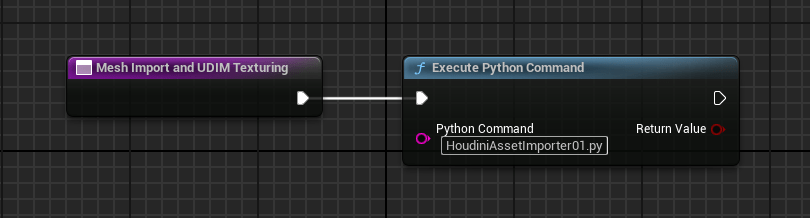
To start, you create a Editor Utility Blueprint in the Content Browser by right clicking within it, and selecting “Editor Utilities” and then “Editor Utility Blueprint”. The class I selected was “Editor Utility Object”. Once it exists in the Content Browser you can rename it, and double-click it to launch the Blueprint Editor.

The purple node to the left is a “call function” node, which you add by going to the left pane, under “Event Graph” you’ll see a category called “Functions” with a plus sign to the right. Click on that, and you’ll have a new purple node which you can rename.

Then add a “Execute Python Command” node by hitting the Tab key, and searching for “execute”. You’ll see it in the list there. After clicking on that name, it will create the node. Connect the white arrow from the “call function” node to the “Execute Python Command” node by dragging from the left to the right white arrow.

Inside the “Python Command” text box, you can type the name of the Python script you want to run. You can choose to store those per-project, but I prefer to have them accessible throughout the Engine itself, so I store them here:

YourDrive:\Epic Games\UE_5.3\Engine\Content\Python

If you copy my scripts and save them there with a .py extension Unreal Engine will be able to execute them, no matter what project you’re working on. However, you do need a Editor Utility Blueprint in your project in the Content Browser to do so.

Hope that helps, more to come…

Deluge

Alex reached out a trembling hand to the roaring waterfall.

They had taken it, his dry place. He had fought, kicked and screamed for help, but it never came. He washed the blood off of his hand, multiple cuts criss-crossing his knuckles. The cave walls were smooth, worn down through time by ancient rivers.

It was the floor you had to watch out for. Alex had stumbled while running, hands splayed out in reflex scraping on the rough stones. Home cave. Some called it “New Chicago” which always confused him. What is a Chicago? He’d ask the question during meals of dried fungus, harvested from the walls in garden galleries.

The elders would just grin and pat him on the shoulder, “Never mind that. How’s the strips? They’re fresh picked!”. Faces pulled back in smiles that hid something inside, he felt it. That dragging pain like the one in his palms, flesh cut open by unyielding stone.

His dry place. Not much in the cave was truly dry. The air was filled with flecks of moisture borne on whispering air currents. The elders warned him to never go to the mouth of the cave, up the steep cliff sloping to the surface. When the rains first came, they said, it was barely enough to make a stream cascading off the ridge.

Now, they said, it was a raging torrent. The world is trying to drown us, so we must go deep and huddle in its warmth. Pirate crews would search the old world for treasures. Alex wanted to be a pirate. They would dance and sing around the fire, telling stories of how they found buried vaults of dry wonders. They would give out precious gifts, brightly colored squares wrapped in clear film.

They tasted sweet and tart, with flavors Alex had never imagined were possible. It was a dry world treasure, they said, made for children to eat. Alex still had one left in his pocket, wrapped tight keeping out the damp. At least the bullies didn’t take that.

They were probably splitting up his things right now, cackling with glee.

He had been warned about going too far, past the modest huts made with stone and topped with strips of fungus too bitter to eat. But he couldn’t help himself. The waterfall where he stood was the extreme limit of the camp, where water turned a wheel powering their lights.

The old generator was another miracle, taken from a dry vault and hauled several days to where they lived. Men died to bring it here. The outer surface was pitted and flaked in spots with rust, green paint glistening under the lights. Alex would come down here sometimes, to listen to it turn and whine.

He’d put his hand on the metal and feel the vibrations, telling it his most precious secrets.

The secret that he kept closest to himself, one that he didn’t dare tell anyone. He wanted to leave. Home cave was home, but it was also something else. He would catch elders sitting in their huts weeping, wiping back tears if they saw him walk past. Smiling to his face, but silent sadness drifting like fine droplets coating everything with despair.

One treasure had changed everything. A book, the only one he had ever seen at camp. He learned the words from the oldest of them all, made a promise to never tell. Reading was not encouraged. Markings were on the treasures, pulled in from the downpour by pirates on the hunt.

They had markings like “Express Delivery”, “Chili 20ea Cans”, “30 Watt Lightbulbs”. Words that he learned, but didn’t understand fully their meanings. Each treasure would be handled by the elders, reverently like they were newborns in a mother’s arms. He couldn’t understand the sadness.

The book, kept in a chest wrapped in cloth. It read “Tour guide – The Sights of Chicago”. Pictures of places and people, tall buildings and “cars” on dark strips, dotted with bright yellow. The elder that taught him, had told him about cars. They were wonderful, moving fast with glass to see the outside.

When Alex asked about the rain, the elder grew silent with growing sadness on his face. The rains, he said, started slowly at first. Then the rivers swelled and rose, sweeping houses and things from their places on dry land. Many lives were lost. Emergency declared, people rushing to shelter.

Buildings failed under the torrents, supports weakened by waterlogged soil. Some collapsed from the sheer weight of water collecting on top, drains and downspouts overwhelmed and bursting. That was when they searched for caves like this one, stretching deep into the ground.

It was one of the few dry places left. But it wasn’t enough.

Alex couldn’t stop dreaming about the pictures he saw, the people happy and smiling. He wanted to walk on the dark strips, talking to people through their clear glass. Maybe they’d invite him in, let him sit on the dry seats and smell the air while they talked about happy things.

Perhaps it was for the best he lost his dry place. It was time to find a new one. He felt in his pockets, hand closing around the colored square.

He would find someone like him, and give them this treasure.

Candy for smiling faces, dry cheeks free from tears.

Adapter

Image: Artefakt 4 Acryl-Öl auf Hartfaserplatte 50 x 40 cm

Bogan scratched his wrist, pulling up the bandage crusted with dried blood. It was his mark, the chineoid blessing so he may travel between zones, feeding the collective. Feeling the shifting pulse of internal chineites he fell to his knees in prayer, bright red blooms blossoming around his wrist, dripping on to the parched ground.

“Please bless this harvest, may the ones who sing in the light be praised. Submit to the body, become the body, forever without end.”

Idle winds stirred loose plastic bags snagged on jutting reinforced steel bars. It was hallowed ground, the interface between chineoid geometric purity and the cursed ruins of the past. Crumbling concrete was piled high in regular mounds, product of the relentless converters chewing through the bones of cursed cities.

Bogan lived near the blessed arch, the curving finger of mechoid gods. Some said it was a connection to the shard itself, the holy seed that sprouted a million fingers each spawning grand arcs of conversion. Like moving a finger through water, bow waves peeling back at curved angles.

The chineites were taking the old and making it new. The holy body, unity of spirit and mind.

Bogan often went to the great wall, throwing in found objects to be absorbed by the shifting surfaces of the chineoids, sometimes receiving blessings in return. His mark was necessary for travel, those that strayed too far from their zone became subject to the conversion process.

Old wives tales of youthful exuberance meeting a cursed end was commonplace. Bogan had seen them in his travels, bodies encased in teeming strands, eyes open and pleading. Some said they lived for many turns, until their bones were left gleaming in the sun.

Blasphemy was not tolerated.

The blessing could only come from the chines putting on the mark, the right of adulthood. Bogan had received his early, a rare exception that brought much speculation to his village. Was he the chosen? Whispered tales told around fires increased his desire to sift the sands for prized relics of the past.

They would never understand. Even those with the mark rarely sat at the great wall, after harvest was done to listen to the sounds. Tendrils of silver beauty waving in the breeze, the chineoids sang as the sun moved across the sky. Bogan would sit cross-legged, staff of metal planted in the ground resting on his forehead.

He would feel the song, deep in his mind. The mark was his connection, the will of the collective. He felt the need for relics, the old metal scraps in ruins of buildings near the wall’s edge. They would direct his hand, joyous light on success, burning pain on failure.

Bogan took the pain as a proof of sacrifice. He must improve to be admitted. Every day he strove to be faster and better, he wanted to be among the blessed few that came from the walls every new year. The blessed had converted faces intertwined with chineoid grace.

Holy clouds of chineoids hovered near their limbs churning and boiling in endless patterns. They would speak to the unconverted, the unmarked and unholy. A movement of their staff, and they would bring an entire village to its knees. If displeased, a finger of god itself would descend, spawning new rippled arcs of converting grace.

Bogan slid down the pile of concrete stones, careful not to lose any of his collected bounty. This offering would be the one, he was sure of it. The song from the collective was too joyous to be anything else. As he held the strange objects in his hands, he could feel the tug of the mark wanting to touch and convert it.

But these were for the holy wall alone.

Advancing to the great arc, standing tall in the noon-day sun. Bogan sat in his customary place marked by the stacking of stones. Sitting on the ground, he put the objects into his lap in a small pile. The wall shifted, questing tendrils dividing like branching rivers towards him.

He threw each object into the waiting fingers, each conveyed to the wall increasing the volume of the song. His last object, with strange buttons and a small window on to a darkened pane of glass. It was most precious of all. The rounded edges felt strange in his hands, like a stone smoothed by the passage of time.

He held it close to the swirling tendril tips, feeling the tug as they burrowed beneath the dark plastic surface tasting the materials hidden inside. The song swelled and silver ropes erupted from the ground, piercing his legs and torso. He was blessed by their touch, honored to be converted.

His vision clouding as chineoids surged through him.

Blessed be the collective, forever without end.

The Arch

Today’s post is an excerpt from my writing notebook – a glimpse into a city where aliens are commonplace.


Working at тупики wasn’t bad, just providing enough credit flow to make the bills go away. At least until the next cycle. I usually sat out front, watching the people along the street. After a while I could pick up things that I’d see over the disconnected strobe-like intervals of staring into the middle distance.

There was the UniBot, that had the cracked rear rim where some ped kicked the hell out of it. It didn’t seem to mind, slowly rotating its greasy wheels until it found a stray connector to fix or a sign that had been torn off by one of the kids up the street. When the weather closed in and the wind started to pick up, I’d switch to the inside.

Not all the way, but in the small foyer between the main door and what I had come to know as “The Arch”.

My boss might have been a split-brained schizo hive-mind exile, but he wasn’t stupid. Plenty of trouble was waiting to cross the threshold between the street and the tattered carpet inside, and he didn’t want anyone starting fires or shooting up the place.

That’s where “The Arch” came into play.

It was huge, at least three of me stacked on top of each other could pass beneath. That was handy since some of the customers we had could reach up and nearly touch the cavernous ceilings inside. It was wide enough to drive a city transport through, so there was never any chokepoint that would cause some of our more skittish patrons any personal space issues.

Hewn from a dense material that seemed to be a fusion of gritty clay and volcanic glass, the surface was pitted and textured as if it had been left out in the centuries worst hurricane, while a volcano erupted nearby belching silica shards that sand-blasted the surface with miniature pits, each dimple dimly reflecting a point of light if you tried to shine a beam on it.

It wasn’t the size that impressed me, it was the dense AI that it held in its opaque innards. I had never seen architecture like that before. The one and only time I gazed upon its guts was when my boss had to reset something via a small access port that only he seemed to know how to open. Inside the glow of billions of optic cross-connects lit half the room before he made a gesture and the mesmerizing lightshow subsided. The Arch could think. And The Arch knew if trouble was coming.

Had one guy, (wrong term? But I couldn’t tell its sex), he waved past me with a few tendrils attached to a knobby arm, and before I could say anything, he was crossing The Arch threshold, nearly into the club.

Two large doors that I had never seen before, one on each side, slid down. I then heard a muffled scream that ended with a odd flash of light, like something from an after-image when you stare at something too bright. It was almost negative in its intensity, but you wanted to screw your eyes shut all the same.

A few seconds later the doors chuffed open and there was nothing but a small bit of swirling ash, quietly being absorbed by the floor of The Arch.

Found out later from the boss he was an assassin that was sent to “retire” a customer in the place. How The Arch knew, I’ll never guess. We allow weapons only if they’re stowed and locked into standby, so it wasn’t what he was carrying that was the tip-off. All I knew was, you don’t sit in The Arch, if you wanted to see another orbit around the sun.

I know, you’re wondering “Why have a guy at the door at all if The Arch is so formidable?”

Good question, let me explain.

My boss prides himself on providing personal service. Sure, there are those mega-clubs where everyone just gets scanned, maybe tagged with a temporary chip to allow access to different parts of the club, like the Rabuho, but that stuff is for tourists interested in the latest shiny thing, not clients of “taste and distinction” as he would put it.

So that leaves me. I’m personable, but able to fade into the background when needed if we have an important guest. You never want to overshadow or out-compete with a guests “spotlight”, the perpetual cloud of recording devices streaming video to all corners of the planet and beyond.

So I help out here and there, and the boss likes me, at least to talk to now and then. I think he misses the hive-mind, so another being that he can relate to relieves that somewhat.

Its a good job, and he pays me under the table, so I don’t have to register a capital account and get scrutinized by the local tax authority, which I’m loathe to do. I have a few past debts that would come creeping up if they discovered I had a way to feed myself.

Another story, but suffice to say that once you are “under the weather”, with technology in this day and age those debts take a life unto themselves, stalking every step you make until you finally relent and settle with the collectors.

I have my reasons, but I’m never going to settle.

Its a matter of principle.

Scuppering

Today’s post is an excerpt from my writing notebook – a glimpse into a city where aliens are commonplace.


It was an okay job, I guess. The guys in the back of the house knew how to work hard, but they also had a dedicated sense of when to goof off. It was necessary, just to preserve some kind of sanity in a place that never really closed. There was no “last call” when you are servicing a metropolis teeming with visitors from all corners.

One night when I was taking some glasses to the back to be prepped and washed, one of the dishwashers poked me with his stubby fingers and said “Youz, Followz”. He used that damn projection thing that they do, that vibrates your skull and makes the words seem to come out of everywhere. Scared the crap out of me.

Looking down, I saw in his beady eyes a sense of urgency, so I put down my rack of dirty glasses and bent low to get into the small access tube he waddled into.

There were some lights strung up like an afterthought at the worlds drunkest party, zig-zagging all over the top of the tunnel until there was a lit heap at the end, where the rest of the string had been thrown. Near the heap we took a fast right and left, until there was a small space where some of the other washers were sitting.

I got the once-over from a bunch of small black beady eyes, but since I was escorted, they stayed put and kept on working at their seats. Each one had a small break crafted into a larger pipe, and I could see waves of liquid pushing through. Looking up, I saw this was one of the many fractured alleys and pathways in the city that had been built over, so there was no entrance other than the one I came from.

A narrow slit of sky was visible, with the floating advertisements blasting colored beams into the foggy night.

They all had a worn cup, that was tied to the pipe in segments, which allowed them to scoop up some liquid and dump it into containers near their feet. The sound was like a gentle scraping, as if ocean waves made of cups would make crashing on to wooden shores. Some were taking hits from the cups too, and looking further down I saw a few of them asleep, cup dangling in their hands.

“Youz Scup, Youz Friendz”

Oh, an invitation then. They cleared a seat at the pipe and I pointed and asked “For Whatz?” and was met with a pause before he said “mucho safez you likez”. Well damn, I guess I won’t go blind. Our metabolisms were similar enough, and this unregulated tap line must be from some pirate brewer somewhere, the smell was like gentle aged whiskey before it got poured into bottles and capped.

I sat and took a worn cup, dipping into the waves — “Noz Waitz” – he slapped the cup out of my hand and I saw the darker debris that was floating inside. Oh, okay… there’s a trick to it.

I watched as he deftly got the cup, dipped into the flow avoiding the particles and slapped it back into my hand.

It was slightly warm, like it had been through a fractioning column. I took a deep swig, and the familiar burn down the back of my throat was all I needed to know.

They had accepted me, I was one of them. I drank, and the warming feeling of the booze pushed back the grey fog leaking from the sky.

Deprivation

I don’t know where it came from. It was during one of those moves, the kind that took me to a new place with unfamiliar faces and rooms the wrong size. Unpacking and unwrapping, kicking empty boxes across the floor into a pile. Arms aching with the sun sinking low.

I didn’t even put the bed frame together, just flopped on the mattress as night fell. Open window letting in the cool breeze. There was plenty to do tomorrow, getting settled and starting the new job. I wondered what my co-workers would look like, if they’d be happy I was there.

Too quickly it was morning, with beams of sunlight prying open my sleepy eyes. I had dreamt of endless cubicle rows, wandering to find a meeting room I couldn’t find. There were no people, just the overhead lights humming as I walked for what seemed like hours.

Washing my face, seeing the circles under my eyes. I looked like a wreck, but it was just the jitters of something new. Maybe I should’ve started the job much later, not a day after my move. It would be fine. Just get through today and I’d be able to get a good sleep tonight.

Work was busy, with calls and meetings. I loosened my tie while stepping outside, catching the bus back to my apartment. Just a few more things to unpack, and then I could relax. A quick dinner and more box wrangling, everything had a place. The shelves were standing tall next to my bed, two smaller tables on either side.

Sitting on the bed, my foot touched a book on the floor. I must’ve dropped it in the bustle of getting things ready. It was a high-quality paperback, with a matte paper cover that felt silky to the touch. There was no title or author, just blank pages as I flipped from the end forward.

Then I saw the pictures.

Endless cubicle rows, machines perched on desks in identical angles. Overhead lights glaring from above. This was different though, there were people in the back. Not brightly lit, just shadows on the edges. I couldn’t tell if they were facing me or turned away.

I put the book down, creeping unease filling my heart with dread. How could that be? Just a coincidence? I picked it up again, turning to the beginning. The same cubicle rows were there, but now with spindly things crawling over the top. One had glowing eyes looking directly at the camera – or however this was captured on paper.

I closed it again and put it on the side table. It was getting late, I wouldn’t solve this puzzle tonight. Sleep came quickly and with it vivid images, smoky column of ash rising from a volcano in the distance. I was alone on a vast field of hardened lava. Neon-bright flows in the distance, catching spindly trees on fire.

I woke, with crickets chirping outside. The moon had risen, bright and full. It was early in the morning, hours before sunrise. I sat up and looked at the book again. Something drew me to it, like the tug of a magnet on the surface of a fridge when you put up a picture. I opened it to the front, turning pages quickly.

The picture was there. Smoky columns and snaking lava flows in the distance. I turned the page ahead, seeing nothing but blank paper. Turning the page back, same volcano but other things were on the fields. Impossibly long legs and withered limbs. This couldn’t be right.

I threw the book on the floor, burying my head in the pillows. I needed some sleep. Even just a few hours before work would be better than nothing. My heart was racing, feeling my pulse throb at my temples. Just keep calm. Get some sleep and look at it fresh in the morning.

The dreams kept coming.

Then I woke, and went to work. Feeling odd, sitting across the desk from my boss. He was explaining something important, but my ears kept fuzzing out. His voice would fade and waver, like he was talking under water. I rose my hand to ask a question. He looked at me, then opened his jaw wide.

Lines of razor teeth in rows all the way back to his throat, dark tongue reaching out.

I woke up, sweating profusely. Pounding in my head. The urge to know, to see the pictures consumed me. Its been days now, I’m not sure. You must be reading the book now, with its pages that are ever changing. Do you see me? Do you see them?

Tell me how to get out, I beg of you.

Don’t turn the page.

Osculator

There’s a comfort to the sameness. Working on the line, processing thousands upon thousands of units every minute. In better times, I’d be making mental plans for trips and fancy purchases. Those were long gone, crushed under a wave of cheap labor and diminishing need for skilled artisans.

I used to have a shop. Small one on the corner of a sleepy street. Not quite downtown, but close enough I could see the shiny towerblocks and remember a time spent in sterile offices and stern conference rooms. Working amongst people who wanted advancement over friendship, grinding me down.

Like a stone being smoothed in the rushing water, edges of character made into similar shapes to those around me. My productivity took a dive from overly-invested to cynical observer. Final days spent looking out fourth-floor windows at graying buildings across the river, not wanting to be at my desk.

I got my wish.

Pushed out on to the bustling sidewalk, pat on the back and empty promises about possible futures. I knew it was ending, but I didn’t see the message written on the wall with my own dissatisfaction. I dove into mundane details, buying a shop and fixing whatever crossed my path.

That too ended in a circular fashion, I found that when turning a screw or replacing a part I would get a flash of its history. Threads of fate tangling in a hardened knot. Sensing more than touching, images and emotions would flood me and I’d have to put the object down.

Not every piece would reveal a story, but soon it happened with alarming regularity. I couldn’t tell if my ability was being honed by handling things steeped in history, or gradual exercise of latent ability. Most of what I repaired had been languishing on a shelf or was a stop-gap before buying a replacement.

It was almost as if what was being repaired was a witness to history, soaking in the sounds and sights to later be retold through my trembling touch. I started to wear gloves, but even then it wouldn’t stop. The flashes of history worming through cotton layers. Even leather gloves weren’t enough to block it out.

There was no hiding from time, or a place.

I hated to sell my shop, but I had to. One night, I was putting away my tools. My hand brushed an old chisel brought in by a white-haired retiree. Jolt of realization, pure horror as the images flashed before my mind’s eye. It had been used to mutilate someone. I could see the victims face tightened in fear, pleading. The old man laughing as he gripped the handle.

I dropped the chisel on the floor, startled. Called the police and told them where they could find it, putting it in the mailbox outside, wrapped in cloth. Locking up, holding a bundle of belongings. Never looked back. I’d like to think its been remade into a book store or a daycare.

I ran all the way home.

Following weeks spent poring over ads, visiting papered-over offices and sitting in dingy temp agencies. I was matched to a night shift factory job. The pay was meager, but the position promised a vital requirement – lack of human contact. It was an assembly line, mostly automated.

It was just me during the night shift. Sometimes a technician would appear, adjust something on one of the swinging robotic arms and then disappear. The oiled precision of the line gave me peace. My job, monitoring output. I was the biological backstop for unblinking eyes scanning the conveyor.

A blast of air would knock out any defective parts from the stream. For those that didn’t succumb to micro-second huffs and puffs, I marked with a tool on the screen. Sometimes I’d pluck one out of the line, a sample for quality. If it passed, I’d pitch it back into the throng. Those that failed were labeled and saved for evaluation.

My mood was steady, like the thrumming of the line. Swinging arms, brightly colored and multi-jointed. Red striped borders on the floor serving as a warning. With the line at full speed the clacking and whirr would drown out my heartbeat. All I felt was the thud of the stamper, the huge machine shook on every down-stroke.

A mechanical heart beating with a singular purpose.

Press a key on the virtual menu, select part.

Highlighted, choose for closer inspection.

I deftly plucked the part out of mid-air, holding it under a magnifying glass. Then the feeling. A sensation like back in the shop, but stronger. Like plucking a conversation out of the crowd, all the murmurs flowing into a tapestry of voices until your name is called.

The electric shock of knowing.

I dropped it to the floor, skittering off the toe of my boot. I sat down on my work stool, peeling off the gloves. Rubbing my face, playing the images back in my mind. The part was one voice in a symphony. Yet I saw the end result. Like moving your hands to catch a ball in flight, not thinking but just doing.

I was going to die.

I sat staring as the line tumbled past in organized chaos.

Every piece had its place, packed in tight with others of its kind.

Like graves on a hillside.

Sapphire

Oscar swore as the drill pipe swung overhead. Brian, his Derrickhand, was getting sloppy on his shift. Each pipe was nine meters long, threaded at the ends to screw together with the next lowered section. That is, if it was lowered properly for Oscar to do so.

“Hey, wake up man! Haul that back up and try again!”, Oscar waved hand signals overhead as Brian slowly got the swinging pipe under control.

This wasn’t their first time working together. The stakes were high enough when drilling on land, they went up when you hauled a bunch of gear out to the frozen wastes of the arctic. It had taken months just to get all of the infrastructure in place, the supplies and fuel stacked in special geodesic domes that wouldn’t get crushed under tons of drifting snow.

They were only good for a few hours each shift, maximum. High winds sometimes made progress difficult. When there was a whiteout you had to rely on the beacon at the main building, pulling yourself along the wires strung on eyehooks pounded into the ice. Sometimes, even the wires were buried.

The Rig Floor was dominated by the rotary table that clamped the pipe and allowed them to hook a string together. A metal mosquito sipping at treasures buried below. In their case, it wasn’t a pocket of hydrocarbons folded into sediments. They were going for a larger quarry.

Oscar mated the pipes, ready to drill down to depth. It had taken weeks to get through the decades of compressed ice using specialized drill attachments. You didn’t want it to shatter, causing containment problems. It had to be lowered in slowly, solid-state lasers pumping joules into the surface, allowing the bit to bite and churn it topside as liquid slurry.

Oscar kept careful watch on the depth. They were near the breakthrough point, where the geologists had said it would transition into compacted methane hydrates. This formation was special. Instead of a thin layer deposited on the sea floor, this pocket had been formed from early glacial activity.

A large concave pit under tons of ice surrounded a massive store of hydrates, all ready to be siphoned up to the surface in special reclamation tanks. It was their job to push through and establish a good seal. Oscar had a bonus riding on his performance, reclaiming more than 50% would mean a big fat check with his name on it.

Oscar squinted at the depth gauge, digital readout flickering with each vibration in the pipe. Most of the gear was custom, and took some getting used to. A green led lit up, signaling proper depth. He glanced at the pressure reading. Nothing. Not a single cubic centimeter was coming through.

It didn’t make sense.

At depth the drillhead would have activated the hydrates, causing them to release their trapped gas molecules. Oscar put his ear on the pipe, straining for the tell-tale hiss of laminar flows. Not a thing. He whipped his hands up signaling Brian to halt.

Removing his gloves, Oscar met Brian at the catwalk next to the drilling floor, piled high with drill pipes.

“We’re getting a whole load of nothing down there.”, Oscar gestured towards the pressure readout.

“After all this? You sure we calibrated it right?”

“Dead sure. Look, I’ve got an idea but we’ll probably have to pull some of the string to do it.”

“You know how much I love backtracking when we drill.”, Brian smiled, punching Oscar in the arm.

Oscar was about to answer when the suspended drill pipe above started to slide downward. Brian must’ve forgotten to secure it before coming down. Both of their faces twisted in horror as the exposed edge slammed into the upright pipe clamped in the table jaws.

whump

Whump

WHUMP

Geysers of snow erupted away from the site in all directions. It was a cascade, cubic meters of hydrate were releasing all at once. Oscar ran, trying to reach the equipment shed. Cracks formed under his feet, others spewing gas blowing snow high up into the air.

A deafening roar as the entire camp sank down into the pack, snow blowing out from every side in large gouts. Oscar ducked behind the trailer, hands on his ears and mouth open trying to save his eardrums from the impending blast. A muted roar came from the hole, soon resounding from all sides.

Each gyser of snow turned into a bluish flame tinged at the edges with yellow. Inverted rocket booster pushing towards the evening sky. The roar was continuous, drowning out any sound. Oscar looked at the rig, perched on large metal pontoons.

Below, brilliant blue light as the motherlode caught fire, flaming sun rising to meet the sky.

Oscar uttered a prayer as it broke the surface, melting the steel deck.